You don't need another course that teaches Figma. You need one that teaches you how to think.
Design is everywhere. Designers who can think — are rare. ViSA's UI/UX program is built on SPARK — so every decision you make has a reason behind it.


The Framework
Why most UI/UX students don't get hired.
They copy Dribbble. They follow tutorials. They can't explain a single decision
they made.
So they build beautiful portfolios that say nothing. And they stay invisible.
It's not a skill problem. It's a thinking problem.
We fix that.
Tools are the easy part.
Figma takes a week to learn. Thinking takes a mindset shift. Companies don't hire people who can use Figma — they hire people who can solve problems. When you master the tools but ignore the thinking, you become easily replaceable.
Tools are easy
Software is updated every year. Fundamentals never change.
Thinking is rare
Anyone can make it pretty. Few can make it work.
Companies hire thinkers
They want partners, not just pixel pushers.
Placed Students

Surya
UX UI Designer


Nandaprakash
UX UI Designer


Sasmitha
R & D


Sivaraj
Sr. UX UI Designer


Ranjith Kumar
Product UX Designer


Hari Viswak
Product Designer

Krithiya
UX UI Designer


Sanjay
App Designer


Manoj Prabhakar
UX Designer

Arun Kumar
Sr. Analyst

Sanjeev Kumar
UX UI Designer


Buddhanesan
UX UI Designer

Gayathri
UX UI Designer
The Framework
This is how we teach
you to think.

The ViSA Difference
SPARK-First Design
Every lesson, every brief, every critique is anchored to the
Visual Storytelling
Your portfolio should tell a story. We teach you to present your thinking, not just your pixels.
Creator Mindset
We don't train executors. We train designers who own their
Portfolio-First Learning
Every project is a portfolio piece. By graduation, you have real case studies — not just exercises.
Where Our Students Work Now
From classrooms to top brands, startups & creative studios worldwide


Design is not just a
job anymore.
It's leverage.
One skill. Infinite returns.
The Curriculum Arc

This phase introduces the SPARK framework, product design thinking, UX fundamentals, and the mindset that separates designers who execute from designers who solve.
- What is UI/UX and why it matters beyond aesthetics
- SPARK framework — how to think before you design
- Human-centered design and accessibility fundamentals
- Visual hierarchy, colour psychology, typography systems
- Workshop: UX Wins vs Fails analysis on real apps
Deep-dive into Figma, UI components, prototyping, and modern UI trends.
- Figma from basics to advanced — components, variables, auto layout
- 32 essential UI elements every designer must know
- Responsive design — mobile, tablet, desktop
- Modern UI trends — Glassmorphism, Neumorphism, Dark Mode, Brutalism
- Workshop: Trend-based UI redesign with interactive prototype


This is where SPARK's A + R steps come alive. You research users, build systems, and work on real sprints.
- AI-assisted user research — personas, empathy mapping, surveys, Maze testing
- UX laws, psychology, and anti-patterns
- Design systems — atomic design, component libraries, tokens
- Branding foundations — Photoshop, Illustrator, logo basics
- Wireframing and rapid prototyping
- Workshop: Research report + persona + insight summary
SPARK's K step in full force — iterate, document, publish, and prepare for the creator economy.
- Framer — build and publish live interactive websites
- AI tools for design — Midjourney, ChatGPT for UX writing, AI wireframing
- 3 Design Sprints — SaaS Dashboard, E-Commerce App, Social Feature
- Portfolio building in Notion and Framer
- Resume, LinkedIn, and career guidance
- Final presentation

50 +
SESSIONS
4+3
PROJECTS & SPRINTS
1
SPARK FRAMEWORK
1 yr
SUPPORT
STUDENT WORK SPEAKS
Portfolio Projects from Our UI UX Designer Course in Chennai

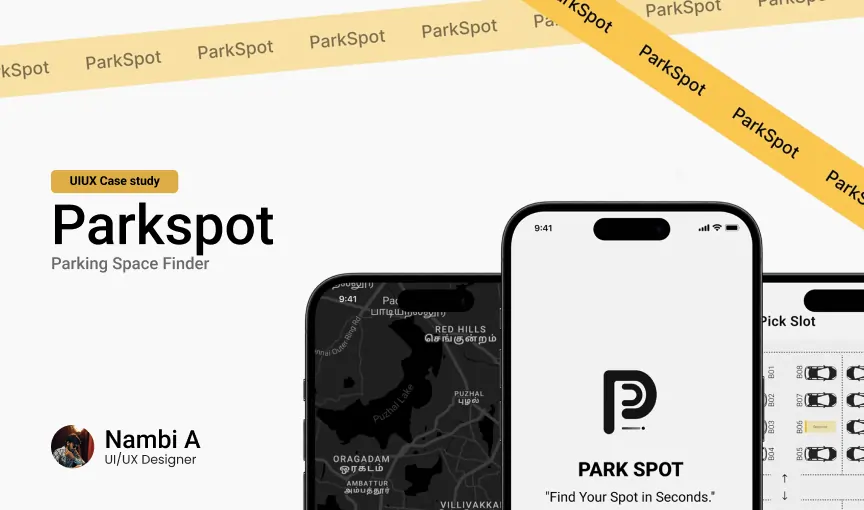
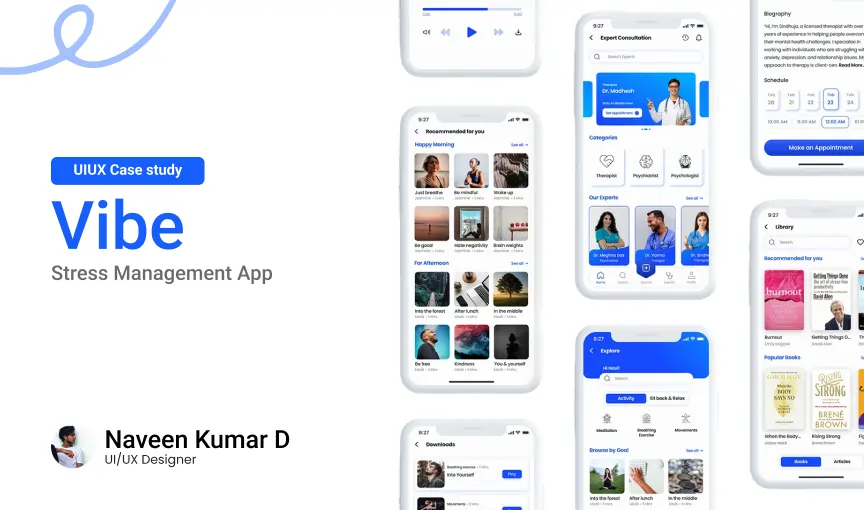

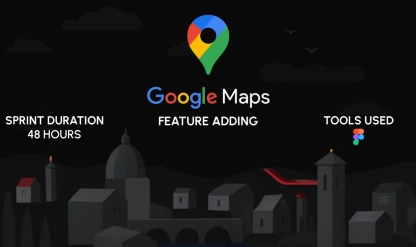

93% of these students secured jobs or started freelancing within 4 months
HEAR FROM OUR GRADUATES
Student Success Stories from Mastery UI UX Designer Course in Chennai
"Highly skilled faculty and amazing learning experience"
I am doing my UX/UI course in Video Superstars Academy. It is one of the best schools if not the best in Chennai. My experience so far has been fantastic. The faculty is highly skilled and impart extensive knowledge from their own experience as designers. They are very helpful and always available incase of any help needed.

Aishwarya Gopal
UX/UI Design
"The best place for exposure and hands-on learning"
I had enrolled for UX/UI Design course here and since then, every day was full of exponential learning and brainstorming. Everything we learn is based on industry demands. So many workshops, seminars and competitions helped me grow. The faculty is friendly and always ready to help. This place became like a family to me. The best part is the strong exposure and Alumni network.

Abhijith Sathyan
UX/UI Design
"Teaches from fundamentals to career success"
I pursued my UX/UI designing course in This Institute. They make sure we understand every concept deeply. Trainers are friendly, especially Amaravathi ma’am. She taught very efficiently and gave proper career guidance. I strongly recommend This Institute for UX/UI if you want to build a strong career. Thanks a lot This Institute.

Yogesh Yogi
UX/UI Design
TOOLS & TECHNOLOGIES YOU’LL MASTER
Work with the same professional tools used by studios worldwide from Illustrator and Photoshop to After Effects and Premiere Pro.
-
Figma
-

Figma AI
-
Adobe XD
-

Adobe Photoshop
-
Adobe Illustrator
-

Framer
-

Adobe Firefly
-

Midjourney
-

ChatGPT
-

Perplexity
-

Notion
-

Gemini
-

Lovable
-

Relume
-

Uizard
-

Maze
Learn From Industry Practitioners, Not Just Teachers
Your mentors aren't giving lectures from textbooks. They're working professionals who live the Creator Economy life.

PRIYADARSHINI
UI/UX Design Trainer & Interaction Designer

AMARAVATHI
Lead Designer & Content Architect

YUTHRA
UI/UX Design Trainer & Product Designer
+ Everything You Need to Know
Frequently Asked Questions
Your most important questions about the Online UI UX Design Course — answered clearly so you can enroll with confidence.